Ventura County Court Docket is the official record that tracks every event, filing, and scheduled hearing in cases handled by the Superior Court of California, County of Ventura. It serves as the public court case listing for civil, criminal, family, probate, and traffic matters filed within Ventura County. The docket includes case numbers, party names, docket entries, motions, court orders, and hearing dates. This legal proceedings schedule allows parties and the public to review case activity in an organized format. Each entry reflects actions taken by the court, attorneys, or litigants, creating a clear timeline of how a case moves through the county judiciary system.
Ventura County Court Docket search plays a key role in keeping court processes transparent and timely. Attorneys rely on the hearing docket to track motions and filing deadlines, and defendants check it to confirm upcoming appearances. Journalists and researchers review case docket Ventura County records for public reporting and data analysis. Members of the public often use the system to review civil disputes or probate filings. This page explains what docket entries mean, how court schedules work, and how to read a court case listing with confidence and clarity.
What Is a Ventura County Court Docket?
Case docket in Ventura County Court refers to the official court-maintained log that records every procedural step in a lawsuit or criminal matter filed with the Superior Court of California, County of Ventura. It acts as a judicial case timeline, listing events in the order they occur from the initial filing to final disposition. A docket is not the full case file. Instead, it is a summarized activity record. Each time a party files a document or the judge issues an order, the clerk adds a new entry to the docket. This creates a structured court filings record that reflects the movement of the case through the legal system.
What Information Appears in Docket Entries?
Docket entries provide a clear snapshot of case activity. They are short, date-stamped notes describing actions taken in the case. These entries help attorneys prepare arguments, assist parties with court appearance planning, and allow the public to follow the progress of a case. The docket works as a real-time judicial case timeline that shows how legal proceedings unfold.
A typical hearing calendar or docket entry may include:
- Case number
- Names of parties
- Filing date
- Type of motion filed
- Hearing date and courtroom
- Judge assignment
- Order issued or ruling entered
- Case status (active, dismissed, closed)
Docket vs. Case File vs. Court Record
The docket is like a table of contents. The case file contains the actual documents referenced in docket entries. The broader court record may include transcripts, exhibits, and final judgments. Anyone reviewing a case docket in Ventura County Court listing sees summaries, not full documents. To obtain copies of filings, a person must request them through court record services, subject to court rules. Many people confuse these terms. They serve related but different functions.
| Term | Meaning |
|---|---|
| Docket | Chronological list of events and filings in a case |
| Case File | Full collection of all submitted documents and evidence |
| Court Record | Official preserved record of proceedings, filings, and transcripts |
Public Access Rules in California
California courts follow statewide public record laws. Most civil, criminal, probate, and traffic dockets are available for public viewing. Yet certain records remain restricted. Sealed cases, juvenile matters, mental health proceedings, and some family law details are confidential. The court limits public visibility in these cases to protect privacy and safety. The hearing calendar for public courtrooms is generally viewable. Still, sensitive filings may appear as restricted entries without detailed descriptions.
How to Perform a Ventura County Court Docket Lookup
Users searching ventura county court docket, case docket ventura county, hearing docket search, or case status tracking usually want direct online results. Ventura County provides a dedicated docket search tool that shows court filings, hearing calendars, and docket entries.
Official Docket Search URL: https://courtservices.venturacounty.gov/Docket/DocketSearch.aspx
Open the Ventura County Docket Search Page
- Type the URL into your browser exactly as shown: https://courtservices.venturacounty.gov/Docket/DocketSearch.aspx
- Wait for the screen to load.
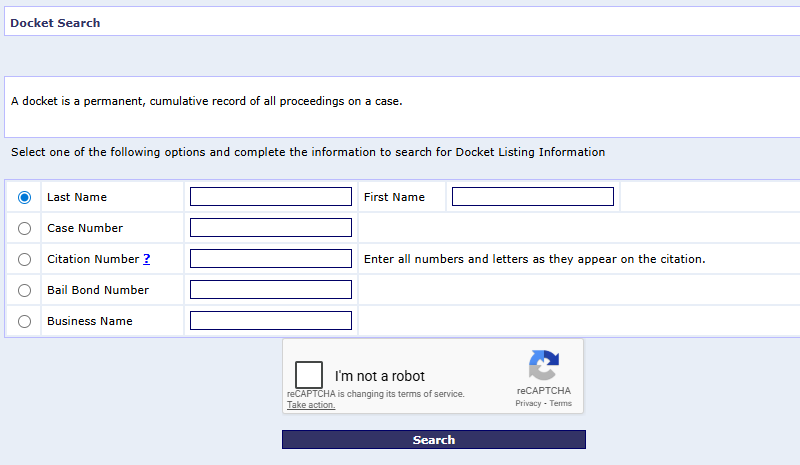
- You will see a search form with fields for case number or party name.
Choose a Search Method
The docket search form lets you find cases using:
- Case Number
- Last Name
- First Name
- Business Name
Enter Case Information Correctly
When performing an online case search, it is essential to enter all information accurately to ensure correct results. Include full names, case numbers, and relevant dates exactly as they appear in court records. Double-check spelling and format to avoid errors that could prevent locating the case. Providing complete and precise details helps the system retrieve the correct documents quickly and reduces delays or confusion in accessing case information.
If Searching by Case Number:
- Enter the full case number exactly.
- Do not add extra spaces or characters.
- If you included letters and digits in your paperwork, type them all.
If Searching by Name:
- Enter Last Name first.
- Add First Name if known.
- Do not include titles like Jr. or Sr. unless needed.
Complete the Security Check
Before results appear, you may need to:
- Click a checkbox for a CAPTCHA
- Confirm you are not a robot
Submit Your Search
- Click the Search button.
- Wait for the results to load.
Review Search Results
Search results typically show:
- Case Number
- Party Names
- Case Type
- Filing Date
- Assigned Department
Scroll to See Docket Entries
Below the summary, the docket entries section shows a chronological list of actions:
- Filed documents
- Orders issued
- Motions heard
- Hearing dates added
Each entry includes the date and a brief description. This provides a clear judicial case timeline.
Check the Hearing Calendar
Look for:
- Hearing date
- Time
- Department number
- Location
What the Docket Search Provides
This official Ventura County docket search:
- Shows court filings record
- Lists docket entries
- Displays the hearing calendar
- Supports case status tracking
Types of Cases Listed in Ventura County Court Dockets
Court case listing Ventura County includes a wide range of legal matters handled by the Superior Court of California and its local branch, the Superior Court of California, County of Ventura. Each division maintains its own docket format and hearing calendar. These dockets create a structured judicial case timeline for public review. Users must select the correct category to view accurate docket entries and case status tracking results.
Civil Docket
The civil docket covers disputes between private parties, businesses, or organizations. These cases focus on legal rights and financial claims rather than criminal penalties. The court filings record shows complaints, answers, motions, discovery updates, and rulings. Civil case timelines often move through multiple hearings before trial or settlement. The hearing calendar lists motion hearings, case management conferences, and trial dates. Civil dockets form a major part of the court case listing Ventura County system.
- Personal injury claims
- Contract disputes
- Property damage cases
- Landlord–tenant matters
- Employment lawsuits
Criminal Docket
The criminal docket includes cases where the state prosecutes a defendant for alleged violations of criminal law. These cases range from misdemeanors to serious felonies. Docket entries typically record arraignments, bail hearings, plea agreements, motions, and sentencing dates. The criminal hearing calendar is time-sensitive and frequently updated. Accurate case status tracking is critical since missed appearances can lead to warrants. Criminal listings appear clearly within the Ventura County court case system.
- DUI charges
- Theft and burglary
- Assault offenses
- Drug-related crimes
- Felony prosecutions
Family Law Docket
The family court calendar manages legal matters involving marriage, children, and domestic relationships. These cases often involve private and sensitive issues. Docket entries may show divorce petitions, custody motions, support orders, and restraining orders. Some information may be restricted under California privacy rules, yet hearing dates and procedural updates still appear. Family law dockets remain active for extended periods when custody or support issues require ongoing court supervision.
- Divorce proceedings
- Child custody disputes
- Child support cases
- Spousal support orders
- Domestic violence matters
Probate Docket
The probate docket handles matters related to estates, guardianships, and conservatorships. These cases focus on asset distribution and legal supervision after death or incapacity. The court filings record includes petitions, notices to heirs, executor appointments, and final accounting approvals. Probate hearing calendars list scheduled reviews and status conferences. Probate matters often extend over months due to statutory notice requirements and asset verification procedures within California courts.
- Estate administration
- Will validation
- Guardian appointments
- Conservatorship cases
- Trust-related disputes
Traffic & Small Claims Docket
The traffic docket addresses vehicle code violations and citation-based cases. These matters usually move quickly through the judicial case timeline. Small claims cases, handled within civil court, involve lower-value financial disputes with simplified procedures. Docket entries display citation filings, hearing dates, fine payments, and final judgments. Many participants represent themselves in these divisions, which makes clear docket information especially helpful for court preparation.
- Speeding tickets
- Red-light violations
- Driving without insurance
- Minor property disputes
- Consumer complaints under small claims limits
Ventura County Hearing Docket & Court Calendar
Hearing docket Ventura County shows scheduled court appearances, assigned departments, and daily courtroom activity. It works alongside the broader case docket maintained by the Superior Court of California, County of Ventura. Many users search the hearing docket for time-sensitive updates, including same-day appearances. The court calendar reflects real-time courtroom schedule changes, making it a key tool for tracking active judicial proceedings timetable entries.
Difference Between a Docket and a Court Calendar
The docket and the daily court calendar serve different purposes within the court case listing Ventura County system. The docket records the full judicial case timeline, including filings and rulings. The courtroom schedule focuses only on upcoming hearings and session times. In simple terms, the docket shows case history, and the calendar shows scheduled appearances. Both tools support court session updates, but they display different types of information.
- Docket: Complete case activity record
- Court Calendar: Upcoming hearings only
- Docket Entries: Filings and court orders
- Calendar Listings: Date, time, courtroom assignment
How to Check Upcoming Hearings
To review the hearing docket in Ventura County, visit the official court website and access the daily court calendar or case search section. Enter a case number or party name to view scheduled sessions, which display hearing dates, department numbers, and start times. Users should verify all details carefully, as courtroom schedules may change. For best results, enter the full case number, confirm the courtroom department, note the hearing time and courthouse location, and recheck the docket one day before the appearance.
Same-Day Hearing Lookup & Courtroom Assignments
Same-day hearing lookup is available through the daily court calendar section of the Ventura County system. This feature allows users to review courtroom schedule updates for the current date. Department numbers identify which judge or courtroom will hear the matter. Some high-volume calendars update throughout the day as cases are called. Always confirm the assigned department before entering the courthouse to avoid delays.
- Search by case number or party name
- Review assigned department number
- Confirm courthouse location
- Monitor updates during the day
Ventura County Court Case Status Tracking
Case status tracking Ventura County allows users to monitor how a lawsuit or criminal matter moves through the court system. The official tracking system is maintained by the Superior Court of California, County of Ventura. It displays docket entries update activity, hearing dates, and changes to the legal proceedings schedule. Regular monitoring helps parties avoid missed hearings and stay informed about rulings, continuances, and final judgments.
What Each Case Status Means
Case status labels appear on the online docket summary page. These terms describe where a case stands in its judicial case progress timeline. Each status reflects a specific procedural stage. Reviewing the status alongside recent docket entries update notes provides a clearer picture of current case activity.
- Filed: The case has been officially submitted to the court and assigned a case number.
- Pending: The case remains active and awaits further hearings, motions, or rulings.
- Continued: A scheduled hearing has been postponed to a later date.
- Closed: The court has finished handling the matter, and no active hearings remain.
- Disposed: The case reached a final outcome through judgment, dismissal, plea, or settlement.
How Often Docket Updates Occur
Docket entries update after new filings, court hearings, or judicial orders. Updates often appear within one business day, though timing may vary depending on court workload and case type. High-volume divisions such as traffic or criminal court may post updates more frequently. Civil and probate cases may reflect updates after motion rulings or scheduled appearances. Users checking case status tracking Ventura County systems should review the docket regularly, especially before court dates.
- Updates usually post within 24-48 hours
- Same-day changes may appear after hearings
- High-volume courts may update multiple times daily
- Holiday closures may delay postings
Email Notifications
Some California courts provide electronic case notification systems for registered users. Availability depends on division and case type. If offered, users may register an email address to receive automatic alerts when docket entries update or hearings are scheduled. These notifications help parties monitor the case progress timeline without repeated manual searches. Users should check the official Ventura County court website to confirm whether email alerts are available for their case category.
- Registration may be required
- Notifications apply to selected case numbers
- Emails alert users to new filings or hearing dates
- Not all case types support automatic alerts
How to Read Ventura County Docket Entries
Docket entries Ventura County show a chronological filing history of everything that happens in a case. These entries are maintained by the Superior Court of California, County of Ventura and form part of the official court record. Each entry contains a date and short description of an action taken, such as motions filed, hearing results, or judicial rulings. Reading them correctly helps users follow the case progress timeline and interpret updates in the legal proceedings schedule.
Common Abbreviations Used in Dockets
Court dockets often use abbreviations to keep entries short and standardized. These codes summarize procedural steps and outcomes within limited space. Recognizing common abbreviations helps users read docket entries Ventura County listings with accuracy. Different divisions may use slightly different shorthand, yet many core terms remain consistent across civil, criminal, and family courts.
- MTN – Motion
- OSC – Order to Show Cause
- CTD – Continued
- JDG – Judgment
- MIN ORD – Minute Order
- TR – Trial
- DISP – Disposed
Minute Order vs. Judgment
Minute orders and judgments serve different roles in a case timeline. A minute order documents what occurred during a hearing, including instructions from the judge and scheduling decisions. It reflects hearing results but does not close the case. A judgment represents the court’s final ruling and formally resolves the dispute. When a judgment is entered, the case status typically changes to closed or disposed in the docket system.
- Minute Order: Summary of hearing outcome
- Judgment: Final decision resolving the case
Motion Entries
Motion entries document formal requests submitted to the court asking for specific action. These filings may request dismissal, modification of custody, evidence exclusion, or summary judgment. The docket entries Ventura County system usually reflects the full motion process from filing to decision. Reviewing this filing history helps users see how judicial rulings shape the case progress timeline.
- Motion Filed
- Hearing Scheduled
- Motion Granted
- Motion Denied
Continuances in Docket Entries
A continuance means the court postponed a scheduled hearing to a later date. Docket entries will show the original hearing date followed by a new scheduled appearance. Continuances may occur because of scheduling conflicts, pending documents, or judicial availability. Users reviewing the legal proceedings schedule should always check for updated hearing results before appearing in court.
- Original Hearing Date
- Continued Entry Posted
- New Hearing Date Assigned
Public Access Rules & Privacy Restrictions
Ventura County court records access follows statewide public record laws that promote transparency in the judicial system. The rules are guided by policies established through the California Courts. Most case dockets, hearing calendars, and filing history details are available for public review. Public docket access California systems allow users to search civil, criminal, probate, traffic, and many family law cases online, subject to privacy limitations.
California Public Access Rules
California law supports open court principles. This means many court filings and docket entries are accessible to the public unless restricted by statute or court order. Users may view case numbers, party names, filing dates, judicial rulings, and scheduled hearings through online portals or courthouse terminals. Public access promotes accountability and allows residents to monitor legal proceedings schedule updates across county courts.
- Civil case listings are generally public
- Criminal case summaries are usually public
- Probate case filings are often viewable
- Traffic case information is typically accessible
Juvenile & Sealed Case Restrictions
Not all records are available for public viewing. Juvenile cases remain confidential under California law. These include delinquency and dependency matters involving minors. Sealed cases are restricted by court order and do not appear in standard public docket searches. In some family law cases, sensitive filings may show limited descriptions or restricted document access.
- Juvenile delinquency matters are confidential
- Adoption records are restricted
- Court-ordered sealed cases remain hidden
- Certain mental health proceedings are limited
Remote Access vs. In-Person Access
Ventura County court records access differs depending on how the request is made. Remote access through online portals provides summary docket entries and basic case details. Full document copies may require in-person requests at the courthouse clerk’s office. Some records are viewable only through public access terminals located inside the courthouse.
- Online access shows summary docket details
- Clerk’s office may provide certified copies
- Some records require identity verification
- Restricted documents remain unavailable remotely
Locations & Clerk Offices
Ventura County courthouse location details help residents find the correct building for hearings, filings, and clerk services. All facilities operate under the Superior Court of California, County of Ventura. Each courthouse handles specific case types and provides a clerk’s office Ventura County public access counter for filings, certified copies, and record searches. Below are the primary court locations with accurate addresses and standard public hours.
Main Courthouse
The Ventura County Government Center – Hall of Justice serves as the main courthouse for Ventura County. It handles criminal, civil, family law, probate, and traffic matters. This location houses multiple courtrooms and major judicial departments. The public access counter provides filing services, case lookups, and certified copy requests.
Address:
800 South Victoria Avenue
Ventura, CA 93009
Court Hours:
Monday–Friday, 8:00 a.m. – 4:00 p.m. (excluding court holidays)
Oxnard Justice Center
The Oxnard Justice Center handles civil, criminal, family, and probate matters for the Oxnard region. It includes several court departments and a staffed clerk’s office Ventura County service window. Visitors should confirm department numbers before arrival.
Address:
4353 East Vineyard Avenue
Oxnard, CA 93036
Court Hours:
Monday–Friday, 8:00 a.m. – 4:00 p.m.
East County Courthouse
The East County Courthouse serves residents in eastern Ventura County. This courthouse commonly handles traffic, small claims, limited civil, and selected criminal matters. A public access counter is available for filings and records assistance.
Address:
3855-F Alamo Street
Simi Valley, CA 93063
Court Hours:
Monday–Friday, 8:00 a.m. – 4:00 p.m.
Juvenile Courthouse
The Ventura County Juvenile Courthouse handles juvenile delinquency and dependency cases. Public access to juvenile records is limited under California law. Authorized parties may file documents at this location.
Address:
4353 East Vineyard Avenue
Oxnard, CA 93036
Court Hours:
Monday–Friday, 8:00 a.m. – 4:00 p.m.
Frequently Asked Questions
The Ventura County court docket system often raises common questions about public access, hearing updates, and case status terms. These answers address time-sensitive and practical concerns users face when reviewing online court records. Each response provides clear, direct information based on procedures followed by the Superior Court of California, County of Ventura and statewide policies from the California Courts.
How do I check my Ventura County court docket?
To check your Ventura County court docket, visit the official court case search system provided by the Superior Court of California, County of Ventura. Enter your full case number for the most accurate result. If you do not have the case number, you may search by last name and first name. After submitting the search, select the correct case from the results page. The docket will display filing history, hearing dates, courtroom assignments, and current case status. Review the hearing calendar carefully and confirm details before appearing in court. If the case does not appear, contact the clerk’s office for further assistance.
Is Ventura County docket information public?
Most Ventura County docket information is available to the public under California open court rules. Civil, criminal, probate, and traffic case summaries can usually be viewed online. Users may see party names, filing dates, hearing schedules, and case status updates. Some records are restricted by law, including juvenile cases, adoption matters, sealed files, and certain confidential family court documents. Even in restricted matters, limited docket entries may appear without detailed document access. Public court records promote transparency while privacy laws protect sensitive information. Anyone seeking certified copies must request them through the courthouse clerk’s office.
How often is the hearing docket updated?
The hearing docket is updated frequently to reflect court session changes and new filings. Many updates appear within one business day after a hearing or judicial ruling. High-volume divisions such as traffic and criminal court may post same-day changes in the afternoon. Civil and probate cases may update after written orders are processed by court staff. Users tracking a legal proceedings schedule should review the docket at least one day before their appearance. Morning checks are helpful for last-minute courtroom schedule adjustments. Update timing may vary during holidays or heavy court calendars.
Can I search Ventura County court cases by name?
Yes, Ventura County allows name-based searches through its online case lookup tool. Enter the last name first and then the first name if known. This method may return several results, especially for common names, so review case numbers and filing dates carefully. A full case number search remains more precise and faster. The system may require a security verification step before showing results. Certain confidential filings will not appear in public searches. If no results display, confirm spelling accuracy and try removing middle initials or extra characters before searching again.
What does “disposed” mean on a docket?
“Disposed” means the court has reached a final resolution in the case. This status appears after a judgment, dismissal, plea agreement, or settlement concludes the matter. Once a case is disposed, it no longer appears on the active hearing calendar. The filing history remains visible for reference, but no future court dates are scheduled. Disposed does not always indicate that a trial occurred. Many cases resolve through negotiated agreements or procedural dismissals. The term simply confirms that the judicial process has formally ended for that case.